After a long day of touring in Costa Rica, we’re usually back at our hotel trying to figure out dinner. Everyone’s tired. The kids are hungry. No one wants to wander around town hoping something is open and family-friendly.
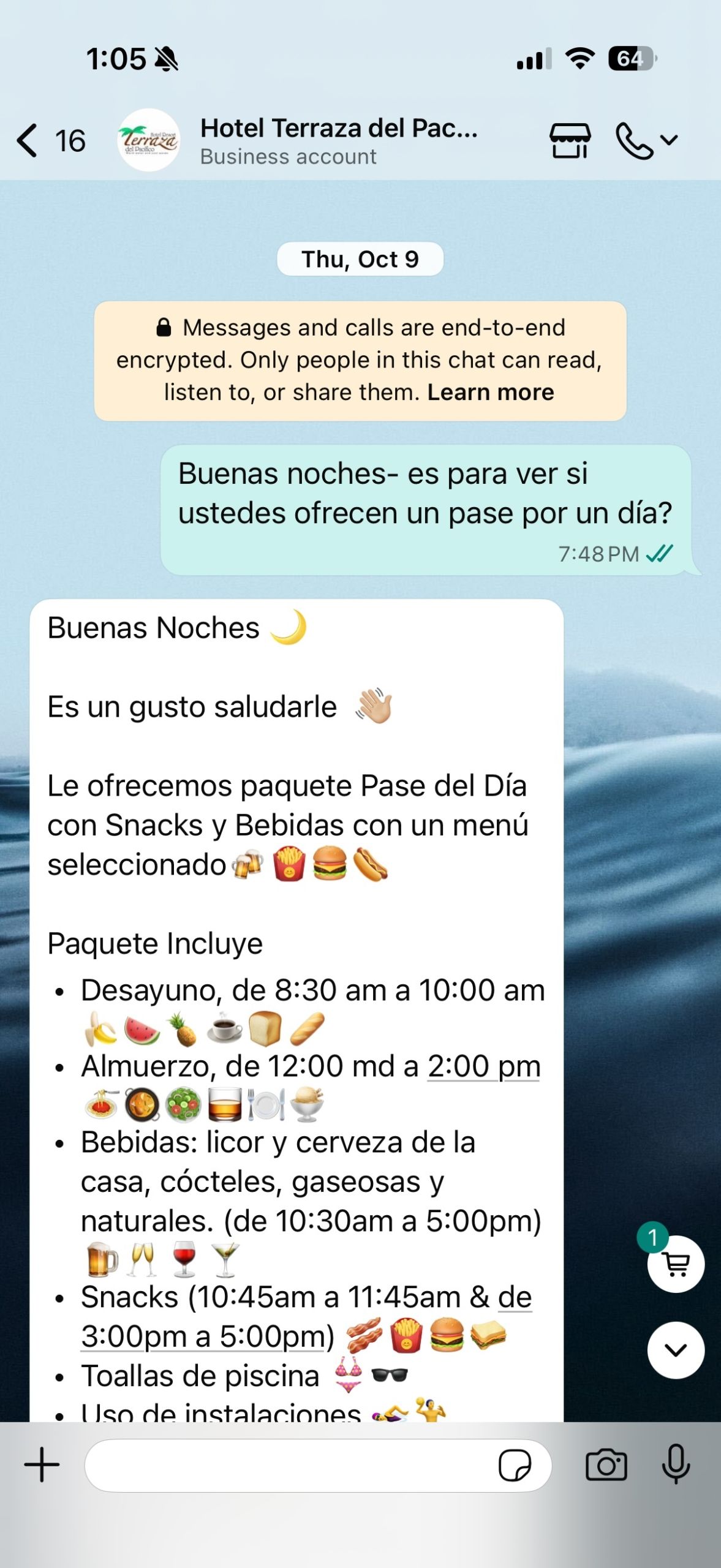
So I open Google, look at nearby restaurants, and tap on their phone number. More often than not, that number connects directly to WhatsApp. I send a quick message asking for their menu.
Within a few minutes, menus start coming in. Sometimes it’s a PDF. Sometimes it’s photos. Occasionally, it’s a voice memo explaining the specials. We look through the options, decide what sounds good, confirm a reservation, and head out.
That’s just one of the many ways I use WhatsApp in Costa Rica when I’m traveling with my family. It’s practical, efficient, and removes a surprising amount of guesswork from the day.
One of the biggest pieces of advice I give my consult clients is to get comfortable with WhatsApp before they even leave for their trip. Once you start using it the way businesses in Costa Rica expect you to, communication becomes much easier and far more responsive.
In this post, I’ll walk you through how WhatsApp works, how to set it up properly, and how I use it alongside reliable mobile data so I’m not scrambling for Wi-Fi when plans shift.
Just starting to plan your trip? Check out my ultimate Costa Rica With Kids guide!

What Is WhatsApp and Why Does It Matter for Travel?
WhatsApp is a messaging app similar to regular text messaging, iMessage, or Signal. It’s owned by Meta, the same company behind Facebook and Instagram, and it uses end-to-end encryption. That level of security is one reason it’s trusted around the world for both personal communication and business.
In Costa Rica, WhatsApp is the primary way businesses communicate with travelers. Hotels, tour operators, rental car agencies, and restaurants use it for confirmations, menus, directions, and real-time updates. You need it if you want fast answers to questions, want to make dinner reservations, or anything, really. But you have to have data if you want to use it on the go.
The biggest advantage of WhatsApp when you’re traveling is that it stays connected to your existing phone number. You verify it once, and that number remains attached to your account no matter where you are. You don’t need to switch numbers when you cross a border, and you don’t need a local phone number to communicate with businesses.
In my own extended family, not everyone has an iPhone, and not everyone uses the same social media platforms. So when any of us travel internationally, we don’t rely on regular text messaging. We use WhatsApp. It keeps everyone connected without international texting charges.
WhatsApp works anywhere you have internet access, whether that’s hotel Wi-Fi or a mobile data plan. You can start conversations from home, continue them on arrival, and follow up after your trip without ever changing your number.
Need help planning your trip? Let’s chat!
How to Add Costa Rica WhatsApp Contacts Before You Leave
As you start researching hotels, tours, shuttles, and restaurants, you’ll notice many Costa Rican businesses prominently display a WhatsApp number.
On websites, you’ll often see:
• A green WhatsApp logo next to a phone number
• A “Contact Us” page with a phone number listed
• A floating green chat button
On Facebook and Instagram, tapping the phone icon often opens WhatsApp directly if it’s installed on your device.
This makes it super easy to get any travel questions answered before, during, or after your trip. But you have to know how to use it effectively before you go!
Did you know I have tons of deals on accommodations and tours throughout Costa Rica?
Step 1: Add the Contact Inside WhatsApp
Open WhatsApp. If you haven’t downloaded it, you can find it easily in the App Store on your phone. You will have to do an SMS authentication to get it up and running, so make sure you do this before you leave for Costa Rica.
In the Chats screen, tap the green plus icon in the upper-right corner and select New Contact.
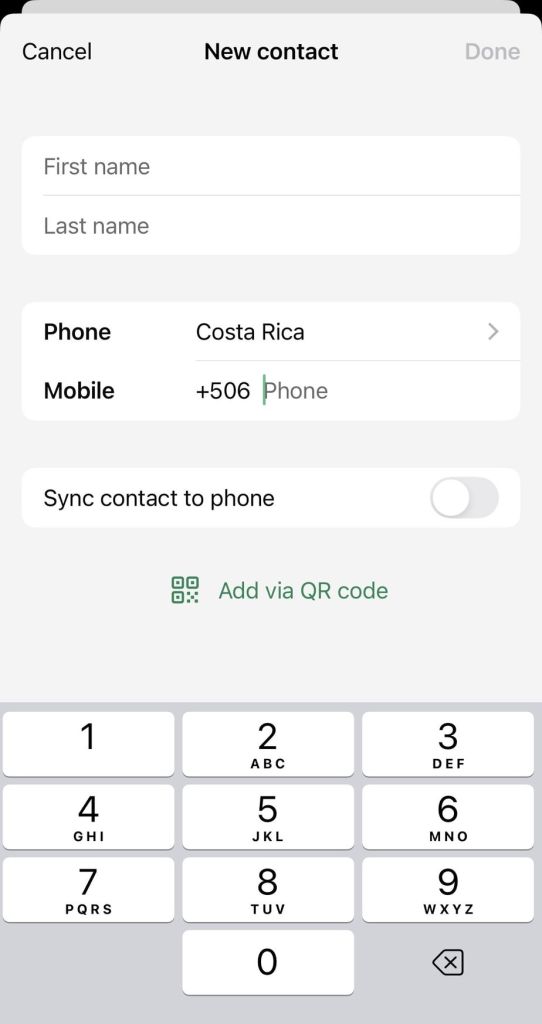
This will come up with a place to put a first and last name.
Where it says “phone” make sure to change the country to Costa Rica. Then, enter the 8 digit phone number where it says Mobile.
There is a setting ot sync the contact to your phone- I don’t do this because I don’t need all the international phone numbers in my main phone contacts.
Save the contact.
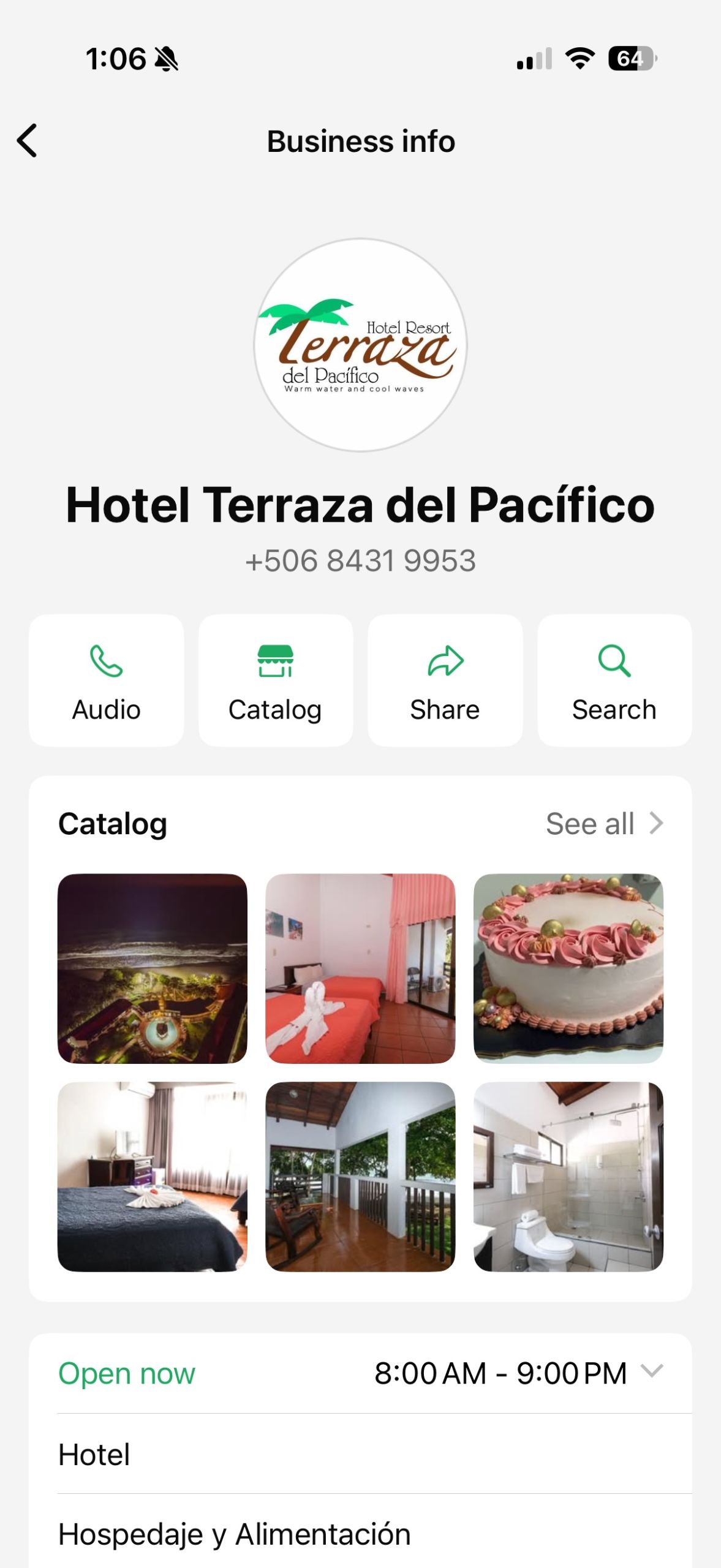
Note: Sometimes you will see that the contact is a business profile. I love this feature because you can often look at a business’s products or a restaurant menu before you even start a chat.
Do keep in mind that many businesses (I’m guilty of this, too!) don’t always have all of their products updated in the business profile, so it is best to confirm via chat that they still have what you are looking for. Also, I don’t recommend paying for any tours or services via WhatsApp.
Need a rental car? Save 10% here.
Step 2: Start the Chat
Go back to Chats, tap the plus icon again, and select the contact you just created.
If the number is correct and the business uses WhatsApp, their profile will appear, and you can send a message.
I try to keep my messages simple in case the recipient’s English isn’t super strong. Something like: “Hi, I’m confirming our reservation for July 18 under the name Smith.” I also avoid voice memos at first, in case the person who is answering the messages is using a text translator.
Pro Tip: Plan From Your Laptop or Desktop?
WhatsApp also has a desktop version. You must install and verify WhatsApp on your phone first. Then you can access the desktop version here.
I LOVE this feature because I like to plan my trips on a bigger screen, and so I can reach out via WhatsApp via the feature on my business’s website. This eliminates the step of having to make a new contact in your phone.
The messages from your desktop will instantly sync with your mobile. You can also send screenshots you might have a question about from the website, which I find helpful. I also just prefer to type on my computer keyboard rather than on my phone.

A Quick Tip About Costa Rica Phone Numbers
Costa Rican mobile phone numbers typically start with 6 or 8, with 8 being very common. Those are usually WhatsApp-enabled mobile numbers.
If you see a number that starts with 2, that’s generally a landline. Landlines are usually not connected to WhatsApp.The country code for Costa Rica is +506, followed by an eight-digit number.
These are my favorite beaches on the Pacific Coast.
How to Use WhatsApp in Costa Rica While Traveling
Once you’re on the ground, WhatsApp becomes your real-time logistics tool. If you want to use WhatsApp off of WiFi you have to have a data plan, and I use unlimited data with Holafly.
Here are some of the practical ways I use WhatsApp during my trip:
- Request a live location pin – WhatsApp syncs with Waze and makes navigating SO EASY.
- Ask a restaurant for their menu and/or make a reservation
- Let a guide know you’re running late
- Confirm a tour pickup time
- Send and receive photos from your guides, or if you purchase the photo package from your tour.
Why Reliable Data Matters When You’re Using WhatsApp All Day
WhatsApp runs entirely on internet data. It does not function like traditional SMS texting.
If you are offline, messages will queue and be sent once you reconnect, but they will not go through without internet access.
This is the same reason real-time navigation tools like Waze are essential when driving in Costa Rica. Those tools only work if you’re connected.
For most families, activating a travel eSIM for Costa Rica before departure is the easiest way to ensure connectivity. That way, your phone connects immediately upon landing without needing a local SIM card or a new phone number.
I personally use a Holafly eSIM because it provides unlimited data and activates as soon as I arrive. You can learn more here.
Unlimited data means I’m not thinking about message limits or roaming charges from my home carrier. They also offer 24/7 customer support if you ever need help getting connected.
WhatsApp is a communication tool, but reliable data is what allows it to function smoothly.
Final Thoughts: Costa Rica Runs on WhatsApp
You do not need a local phone number in Costa Rica.
You do need WhatsApp set up properly and reliable internet access.
Once you understand how businesses communicate and you start using WhatsApp the way locals do, your trip becomes easier to manage.
If you decide to use Holafly for your travel eSIM, you can use my code PURAVIDAMOMS to save 5%.
Get your travel eSIM here.
So remember, before you leave, download WhatsApp, test it, save your key contacts, and make sure you have a data plan ready. It will make yourl trip 1,000% smoother!
This post is sponsored by Holafly. All opinions are my own.